
GNU MAKE
Introduction of Make
| INTRODUCTION |
| Creating a binary in a compiled language often involves lots of steps to compile all of the source files into object code and then invoking the linker to put the object code modules together into an executable. |
| The necessary steps can all be performed by hand, but this becomes tedious very quickly. |
| Another solution would be to write a shell script rather than executing commands each time on your own. This is a better solution but has a number of drawbacks for larger projects and tends to be hard to maintain over the life of the project. |
| Building software has a number of unique requirements that justify the development of a tool that is specifically targeted at automating the software build process. |
| The developers of UNIX recognized this requirement early on and developed a utility named make to solve the problem. |
| The open-source implementation of the make utility is commonly used in Linux software development. |
Example Project Roadmap to learn the make building Process
| An Example Project |
| A simple example project to build the project starting with a command-line solution and progressing to a fairly complete GNU make implementation. |
| The examples in this chapter will show various ways to build a project consisting of four source files and one header file. |
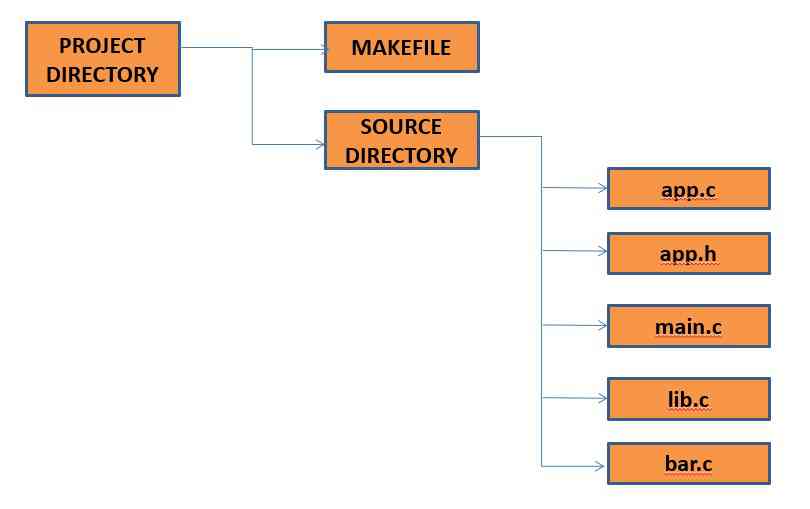
Compiling by typing Individual commands.
| Compiling by typing Individual commands. |
| The simplicity of the example project makes it very easy to compile by hand. Executing the following command in the top-level project directory will generate the application named appexp with a single command. |
gcc -o appexp src/main.c src/app.c src/bar.c src/lib.c
|
| The above command runs the GCC wrapper program that invokes the preprocessor, compiler, and linker to turn these four c-files into an executable. The single command approach is acceptable for such a simple project, but for a larger project this would be impractical. The following set of commands breaks the compilation into the incremental steps commonly seen in a more complicated build process. |
gcc -c -o main.o src/main.c

 gcc -c -o app.o src/app.c

gcc -c -o bar.o src/bar.c

gcc -c -o lib.o src/lib.c

gcc -o appexp main.o app.o bar.o lib.o
|
| The first four commands in this series turn the c-files in the src directory into object files in the current directory(top-level directory). The last command invokes the linker to combine the four generated object files into an executable. |
Automate the make build using bash Script
| A Build Script |
| The next obvious step would be to put these commands into a script so that a single command could perform all of the steps needed to build the application. The following listing shows the contents of the buildit script that might be written to automate the build process. |
#!/bin/sh

# Build the chapter 5 example project

gcc -c -o main.o src/main.c

gcc -c -o app.o src/app.c

gcc -c -o bar.o src/bar.c

gcc -c -o lib.o src/lib.c

gcc -o appexp main.o app.o bar.o lib.o
|
| One of the disadvantages of the build script is that it rebuilds the entire project every time it is invoked. For the small example in this chapter, this does not cause a significant time increase in the development cycle, but as the number of files increases, rerunning the entire build process turns into a significant burden. |
| One of the major enhancements of the make utility over a shell script solution is its capability to understand the dependencies of a project. Understanding the dependencies allows the make utility to rebuild only the parts of the project that need updating due to source file changes(based on timestamps). |
| Make rebuilds only those source files, based on last modification time. |
A simple Makefile for example project
| A simple Makefile for example project |
| The following listing illustrates a Makefile used to build the example project. |
appexp: main.o app.o bar.o lib.o

gcc -o appexp main.o app.o bar.o lib.o

main.o : src/main.c src/lib.h src/app.h

gcc -c -o main.o src/main.c

app.o : src/app.c src/lib.h src/app.h

gcc -c -o app.o src/app.c

bar.o : src/bar.c src/lib.h

gcc -c -o bar.o src/bar.c

lib.o : src/lib.c src/lib.h

gcc -c -o lib.o src/lib.c
|
| Line 1 illustrates the basic construct in Makefile syntax, the rule. The portion of the rule before the colon is called the target, while the portion after the colon is the rule dependencies. Rules generally have commands associated with them that turn the prerequisites into the target. |
| In the specific case of line 1, the target of the rule is the appexp application that depends on the existence of main.o, app.o, bar.o, and lib.o before it can be built. |
| Line 2 illustrates the command used to invoke the linker to turn the main.o, app.o, bar.o, and lib.o object files into the appexp executable. |
| It is important to put a hard tab in front of the commands in a Makefile; this is how the make utility differentiates commands from other Makefile syntax. The make utility uses rules to determine how to build a project. |
| The rule on line 1 tells the make utility that to build appexp, it must have the files main.o, app.o, bar.o, and lib.o. make will check for the existence of those files to determine if it has everything needed to build the application. If one of the prerequisite files is missing or is newer than the target, then make will start searching the target rules to determine if it has the rule to create the prerequisite. |
| Thus the make utility chains rule together into a tree of dependencies that must be satisfied to build the original target. make will then start executing the commands associated with the rules at the leaves of the tree to build the prerequisites needed to move back toward the root of the tree. |
| Building software has a number of unique requirements that justify the development of a tool that is specifically targeted at automating the software build process. |
| First, it would find a rule to create main.o, which occurs on line 3. Next, make would examine the rule on line 3 and realize that the main.c, lib.h, and app.h prerequisites all exist, so the commands to create main.o (line 4) would be executed. The next prerequisite needing to be created would be app.o, so make would move to the rule on line 5 and execute the command on line 6. This process would then continue to create bar.o and lib.o, and finally, the command on line 2 would be executed to create the application. |
| If the make command is executed in a clean directory, then it would be expected that make would automatically execute the following series of commands: |
gcc -c -o main.o src/main.c

gcc -c -o app.o src/app.c

gcc -c -o bar.o src/bar.c

gcc -c -o lib.o src/lib.c

gcc -o appexp main.o app.o bar.o lib.o
|
| How did GNU make eliminate the need for the other commands? |
| Since GNU make understands each step that goes into the creation of the executable, it can examine the dates (last modification time) on the files to determine that nothing in the dependency tree for main.o, bar.o, and lib.o changed, and thus these object files don’t need to be re-created. |
| If you understand the dependency tree that is represented in the Makefile syntax, then you understand the power of make over a simple build script. |
| The Makefile syntax also provides other capabilities beyond those that have been discussed in this section. |
Make Utility
| Make Utility |
| If you run on terminal or shell
make this program will look for a file named makefile in your directory, and then execute it. make -f MyMakefile |
| The basic Makefile
The basic makefile is composed of: target: dependencies [tab] system command This syntax, when applied in real, would look like: all: gcc main.c hello.c factorial.c -o hello
• We see that our target is called all. This is the default target for makefiles. • The make utility will execute this target if no other one is specified. • We also see that there are no dependencies for target all, so make safely executes the system commands specified. • Finally, make compiles the program according to the command line we gave it. |
Make Utility: Using dependencies
| Make Utility: Using dependencies | |
Sometimes is useful to use different targets. This is because if you modify a single file in your project, you don’t have to recompile everything, only what you modified.
all: hello

hello: main.o factorial.o hello.o
                       gcc main.o factorial.o hello.o -o

main.o: main.c
                        gcc -c main.c

factorial.o: factorial.c
                       gcc -c factorial.c

hello.o: hello.c
                       gcc -c hello.c

clean:
                       rm -rf  *.o  hello
|
|
| Now we see that the target all has only dependencies, but no system commands. In order for make to execute correctly, it has to meet all the dependencies of the called target (in this case all). | |
| Each of the dependencies is searched through all the targets available and executed if found. In this example, we see a target called clean. It is useful to have such a target if you want to have a fast way to get rid of all the object files and executables. |
|
Make Utility: Using variables and comments
| Make Utility: Using variables and comments | |
You can also use variables when writing Makefiles. It comes in handy in situations where you want to change the compiler or the compiler options.
# I am a comment, and I want to say that the variable CC will be
 # the compiler to use.
CC=gcc
# Hey, I am comment number 2. I want to say that CFLAGS will be the
# options I'll pass to the compiler.
CFLAGS=-c - Wall
all: hello

hello: main.o factorial.o hello.o
                       $(CC) main.o factorial.o hello.o –o hello

main.o: main.c
                        $(CC)  $(CFLAGS)  main.c

factorial.o: factorial.c
                        $(CC)  $(CFLAGS)  factorial.c

hello.o: hello.c
                        $(CC)  $(CFLAGS) hello.c

clean:
                       rm -rf  *.o  hello
|
|
|
|
Makefile Variables
| Makefile Variables |
| The variables allow a name to be associated with an arbitrarily long text string. The basic syntax to assign a value to a variable is:
MY_VAR = A text string |
| The value of a variable can be retrieved in subsequent portions of the Makefile by using the following syntax: ${var-name}, where var-name is replaced with the name of the variable that is being retrieved. |
| We will discuss a sample makefile in the next slide to illustrate, how to manipulate the make file variables, with functions provided by make utility. |
| make file syntax for a function call takes the general form of ${func arg1,arg2,…). |
| Input Makefile | ||
SRC_VAR=My test string for variable manipulation.
TEST1_VAR=$(subst  for,foo,${SRC_VAR}) TEST2_VAR=$(patsubst  t%t,T%T, ${SRC_VAR}) TEST3_VAR=$(filter  %ing  %able, ${SRC_VAR}) TEST4_VAR=$(sort  ${SRC_VAR})
TEST5_VAR=$(words  ${SRC_VAR}) TEST6_VAR=$(word  2,${SRC_VAR}) TEST7_VAR=$(wordlist  2, 3, ${SRC_VAR})

all:
         @echo original str: ${SRC_VAR}
         @echo substitution: ${TEST1_VAR}
         @echo pattern sub : ${TEST2_VAR}
         @echo filter : ${TEST3_VAR}
         @echo sort : ${TEST4_VAR}
         @echo word count : ${TEST5_VAR}
         @echo word 2 : ${TEST6_VAR}
         @echo word 2 and 3: ${TEST7_VAR}
|
||
|
||
| Makefile functions: subst, patsubst, filter, sort, words, word, and wordlist. |
||
| Notice the use of the @ before the echo commands tells the make utility to suppress the printing of the command line before it executes. |
A simple Makefile for example project: Revisit
| A simple Makefile for example project : Revisit |
| The following listing illustrates a Makefile used to build the example project. |
appexp: main.o app.o bar.o lib.o

gcc -o appexp main.o app.o bar.o lib.o

main.o : src/main.c src/lib.h src/app.h

gcc -c -o main.o src/main.c

app.o : src/app.c src/lib.h src/app.h

gcc -c -o app.o src/app.c

bar.o : src/bar.c src/lib.h

gcc -c -o bar.o src/bar.c

lib.o : src/lib.c src/lib.h

gcc -c -o lib.o src/lib.c
|
| Pattern Matching Rules | |
SRC_FILES=main.c app.c bar.c lib.c

OBJ_FILES=$(patsubst %.c, %.o, ${SRC_FILES})

VPATH = src

CFLAGS = -c -g

LDFLAGS = -g

appexp: ${OBJ_FILES}

gcc ${LDFLAGS} -o appexp ${OBJ_FILES}

%.o:%.c

gcc ${CFLAGS}  -o  $@  $

clean:

rm *.o appexp

MAIN_HDRS=lib.h app.h

LIB_HDRS=lib.h

main.o : $(addprefix  src/, ${MAIN_HDRS})

app.o : $(addprefix    src/, ${MAIN_HDRS})

bar.o : $(addprefix    src/, ${LIB_HDRS})

lib.o : $(addprefix     src/, ${LIB_HDRS})
|
• Lines 1 to 4 set up the variables that will control the build process.
• Line No. 3: The pattern substitution will result in the OBJ_FILES variable being assigned the value main.o app.o bar.o lib.o. • Line No.6: appexp target use OBJ_FILES variable as its dependency list. • Line 16 to 19: use a function called addprefix • Line 12 to 15 are simple to understand. • Line 8: Use a pattern rule to transform an arbitrary file ending with a .c extension into a corresponding file ending in a .o extension. • Line 9: the $@ variable contains the filename matched for the left side of the rule, and the $ variable contains the filename matched for the right side of the variable. • The pattern matching rules assume that the left and right sides of the pattern rule both occur in the same directory. But in the example project, the source files are all contained in the src directory. One level up from Makefile. • To resolve the situation, the VPATH feature of GNU make is used to provide the pattern matching rules with a list of search directories to use when the right side of a rule isn’t found in the current directory. |
| Try it on your own |
CC=gcc

CFLAGS=-c -Wall

LDFLAGS=

SOURCES=main.c hello.c factorial.c

OBJECTS=$(SOURCES:.c=.o)

EXECUTABLE=hello

all: $(EXECUTABLE)


$(EXECUTABLE): $(OBJECTS)

                        $(CC)  $(LDFLAGS)  $(OBJECTS)  -o $@

%.o :  %.c       # We can also use     “.c.o” as target without stating dependency.

             $(CC)   $(CFLAGS)   $< -o   $@
|
| If you understand this last example, you could adapt it to your own personal projects changing only 2 lines, no matter how many additional files you have !!!. J J J |

