
BUILDING AND USING LIBRARIES
Basic and Types of Libraries
| What Is a library? |
| A library is really nothing more than a collection of object files. |
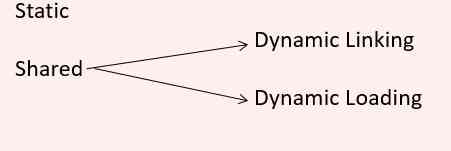
| Type of libraries in Linux:
|
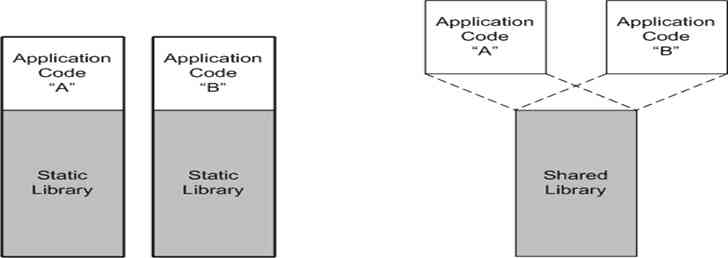
| Static libraries: Once the application developer compiles and then links with the library, the needed elements of the library are integrated into the resulting executable image. From the perspective of the application, the external library is no longer relevant because it’s been combined with the application image. |
| Shared – Dynamic Linking: You can dynamically link your program with the shared library and have Linux load the library upon execution (unless it’s already in memory). |
| Shared – Dynamic Loading: With dynamic loading, an application program can itself load a specific library (unless already loaded), and then call a particular function within that library. |
Difference b/w Static and Shared Libraries
| Static Library | Shared Library |
| Static libraries can be beneficial in small programs where minimal functionality is needed.
With a static library, every running program has its own copy of the library. |
For programs that require multiple libraries, shared libraries can reduce the memory footprint of the program (both on disk and in memory at run time).
This is because multiple programs can use a shared library simultaneously. Therefore, only one copy of the library is needed in memory at a time. |
Sample project Roadmap to implement Static and Shared libraries
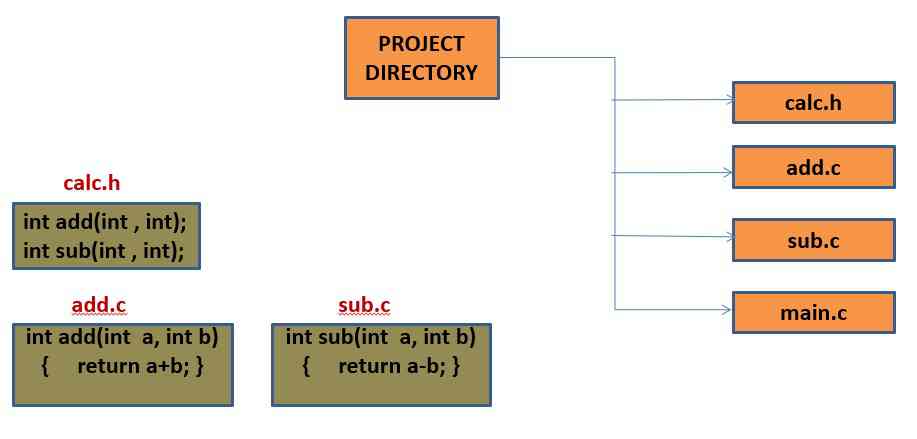
Steps to Build a static library in Linux
| Building Static Library (.a) |
$ gcc -c -Wall add.c

$ gcc -c -Wall sub.c
We specify the -c option to tell gcc to compile only (don’t link) and also to turn on all warnings. This will generate add.o and sub.o |
$ ar -cru libmycalc.a add.o sub.o
ar command to build our library (libmycalc.a). The c option specifies to create the static library (unless it already exists, in which case the option is ignored). The r option tells ar to replace existing objects in the static library (if they already exist). The u option is a safety option to specify that objects are replaced in the archive only if the objects to be inserted are newer than existing objects in the archive (of the same name). We now have a new file called libmycalc.a, which is our static library containing two objects: add.o and sub.o. Let’s now look at how we can build our application using this static library. |
$ gcc main.c   -L.  -lmycalc  -o  main

$  ./main
|
| The -L. option tells gcc that libraries can be found in the current subdirectory (. represents the directory). The -L option identifies the library to use. When the -L option is used, it automatically surrounds the name specified with lib and .a . Therefore, if the user had specified
-lmycalc, gcc would look for a library called libmycalc.a. |
| Building Static Library (.a) |
• We can inspect a static library to see what’s contained within it by using the -t option:
$ ar -t libmycalc.a
add.o sub.o |
If desired, we can also remove objects from a static library. This is done using the -d option.
   $ ar -d libmycalc.a sub.o

   $ ar -t libmycalc.a
add.o |
It’s important to note that ar won’t actually show a failure for a delete. To see an error message, if the delete fails, add a -v option.
  $ ar -d libmycalc.a  sub.o

  $ ar -dv libmycalc.a subo
No member named ‘sub.o’ |
| Rather than remove the object from the static library, we can extract it using the -x option.
$ ar -xv libcalc.a sub.o
x – initapi.o
$ ls
sub.o libmycalc.a
$ ar -t libmycalc.a
add.o sub.o |
| The extract option doesn’t actually remove the object, it only copies it externally to the archive. The delete (-d) option must be used to remove it outright from the static library. |
Important Options for the ar Utility
| Important Options for the ar Utility | ||
| Option | Name | Example |
| -d | Delete | ar -d <archive> <objects> |
| -r | Replace | ar -r <archive> <objects> |
| -t | Table list | ar -t <archive> |
| -x | Extract | ar -x <archive> <objects> |
| -v | Verbose | ar -v |
| -c | Create | ar -c <archive> |
| -ru | Update object | ar -ru <archive> <objects> |
Steps to Build Shared – Dynamic linking Library
| Building Shared – Dynamic linking Library |
|
  $ gcc -fPIC -c add.c

  $ gcc -fPIC -c sub.c
• This results in two new object files containing position-independent code. • We can create a shared library of these using gcc and the -shared flag. |
$ gcc -shared add.o sub.o -o libmycalc.so
|
$ gcc main.c -L. -lmycalc -o main
|
$ ldd test
libmycalc.so => not found libc.so.6 => /lib/tls/libc.so.6 (0x42000000) /lib/ld-linux.so.2 => /lib/ld-linux.so.2 (0x40000000) |
| Building Shared – Dynamic linked Library |
| • The standard C library is shown (libc.so.6)
• The dynamic linker/loader (ld-linux.so.2) • Note that our libmycalc.so file is shown as not found. • It’s present in the current subdirectory with our application, but it must be explicitly specified to GNU/Linux through the LD_LIBRARY_PATH environment variable. |
$ export LD_LIBRARY_PATH=./

 $ ldd test
libmycalc.so => ./libmycalc.so (0x40017000) libc.so.6 => /lib/tls/libc.so.6 (0x42000000) /lib/ld-linux.so.2 => /lib/ld-linux.so.2 (0x40000000) |
If we had tried to execute our application without exporting LD_LIBRARY_PATH=./ , a reasonable error message would have resulted, telling us that the shared library could not be found:
$ ./test
./test: error while loading shared libraries: libmycalc.so: cannot find shared object file: No such file or directory. |
Steps to Build Shared – Dynamic loaded Library
| Building Shared – Dynamic loaded Library |
| •The final type of library that we’ll explore is the dynamically loaded (and linked) library.
• This library can be loaded at any time during the execution of an application, unlike a shared object that is loaded immediately upon application start-up.
|
 $ gcc -fPIC -c add.c

 $ gcc -fPIC -c sub.c

 $ gcc -shared add.o sub.o -o libmycalc.so

 $ su –

  <provide your root password>

 $ cp libmycalc.so /usr/local/lib
|
| Note: In order to copy our library to /usr/local/lib, we must first gain root privileges. To do so we use the su command to create a login shell from the root user. |
| • Now that we have our shared library re-created, how do we access this in a dynamic fashion from our test application?
• The answer is that we must modify our test application to change the way that we access the API. |
| Building Shared – Dynamic loaded Library |
The dynamically loaded library API is very simple and are declared in <dlfcn.h>
|
#include<stdio.h>

#include<stdlib.h>

#include<dlfcn.h>

#include"calc.h"

void main()

 {

   int a,b,result;

   void *handle;

   char *err;

   int (*add_d)(int,int);

   int (*sub_d)(int,int);


    /* Open a handle to the dynamic library */

   handle=dlopen("/usr/local/lib/libmycalc.so",RTLD_LAZY);

   if(handle==(void *)0)

    {

      fputs(dlerror(),stderr);

      exit(-1);

    }


  /*Check access to add() function*/

    add_d= dlsym(handle,"add");

    err = dlerror();

    if(err!=NULL)

    {   fputs(err, stderr);

        exit(-1);

    }


 /*Check access to sub() function*/
    sub_d= dlsym(handle,"sub");
    err = dlerror();
    if(err!=NULL)
    {   fputs(err, stderr);
        exit(-1);
    }

     // Call dynamic add function

    printf("Enter 2 numbers\n");
    scanf("%d %d",&a,&b);
    result= (*add_d)(a,b);
    printf("\n Result after add = %d",result);
   // Call dynamic sub function

    printf("\nEnter 2 numbers\n");
    scanf("%d %d",&a,&b);
    result= (*sub_d)(a,b);
    printf("\n Result after add = %d",result);

   // Close our handle to the dynamic library
     dlclose(handle);

   }
|
|
Supporting Utilities : file, size, nm, objdump, ranlib
| Utilities : file , size, nm |
| file: The file utility tests the file argument for the purposes of identifying what it is.
$ file /usr/local/lib/libmycalc.so
/usr/local/lib/libmyrand.so: ELF 32-bit LSB shared object, Intel 80386, version 1 (SYSV), not stripped $ So, using file utility, we can see that our shared library is a 32-bit ELF object for the Intel 80386 processor family. It has been defined as “not stripped,” which simply means that debugging information is present. |
| size: The size command provides us with a very simple way to understand the text, data, and bss section sizes for an object.
$ size /usr/local/lib/libmycalc.so
text data bss dec hex filename 2013 264 4 2281 8e9 /usr/local/lib/libmycalc.so |
| nm : This commands permits us to look at the symbols that are available within a given object file
$ nm -n /usr/local/lib/libmycalc.so | grep " T "
we use nm to print the symbols within the shared library, but then only emit those with the tag ” T ” to stdout (those symbols that are part of the .text section, or code segments). We also use the -n option to sort the output numerically by address, rather than the default, which is alphabetically by symbol name. This gives us relative address information within the library; if we wanted to know the specific sizes of these .text sections, we could use the -S option. |
| Utilities: objdump, ranlib |
| objdump: The objdump utility is similar to nm in that it provides the ability to dig in and inspect the contents of an object.
$ objdump -disassemble -S /usr/local/lib/libmycalc.so
• -disassemble (to disassemble to the native instruction set) • -S to output interspersed source code
|
| ranlib : The ranlib utility is one of the most important utilities when creating static libraries.
• This utility creates an index of the contents of the library and stores it in the library file itself. • When this index is present in the library, the linking stage of building an image can be sped up considerably. • Therefore, the ranlib utility should be performed whenever a new static library is created. $ ranlib libmycalc.a
• Note that the same thing can be performed using the ar command with the -s option, as:
$ ar -s libmycalc.a
|

