
GNU COMPILER TOOL CHAIN
Basics of GNU compiler
| GNU COMPILER TOOL CHAIN |
| The GNU Compiler Collection (otherwise known as GCC) is a compiler and set of utilities to build binaries from high-level source code. |
| It’s also the standard for embedded systems development as GCC supports so many different target architectures. |
| Our use here will concentrate on host-based development (building software for the platform on which we’re compiling). |
| But if we were cross-compiling (building for a different target) then GCC provides support for 40 different architecture families. |
| GCC also supports a number of other languages, outside of standard C. |
| We could compile for C++, Ada, Java, Objective-C, FORTRAN, Pascal, and three dialects of the C language. |
Introduction to Compilation: Different Stages
| Introduction to Compilation |
| The GNU compiler takes a number of different stages in the process of building an object. These stages can be filtered down to four: preprocessing, compiling, assembling, and linking.
|
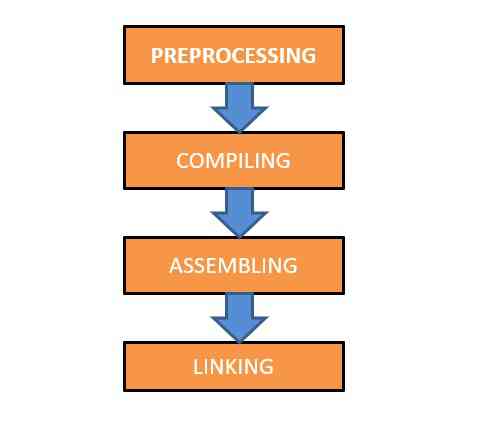
Compilation Stages with Inputs and Outputs produced by GCC
| Stage | Input | Output | GCC Example |
| Preprocessing | *.c | *.i | gcc -E test.c -o test.i |
| Compiling | *.i | *.s | gcc -S test.i -o test.s |
| Assembling | *.s | *.o | gcc -c test.s -o test.o |
| Linking | *.o | * | gcc test.o -o test |
Patterns for GCC
| Patterns for GCC (Compile, Compile and Link) |
| The simplest example from which to begin is the compilation of a C source file to an image. In the following example entire source necessary is contained within the single file, so we use GCC as follows: |
| $ gcc test.c -o test |
| If instead, we wanted just the object file for the source, we’d use the -c flag, as follows: |
| $ gcc -c test.c |
| By default, the resulting object is named test.o, but we could force the output of the object to newtest.o, as: |
| $ gcc -c test.c -o newtest.o |
| Most programs we’ll develop will involve more than one file. Below, we compile three source files (first.c, second.c, and third.c) and link them together into the executable named image. |
| $ gcc -o image first.c second.c third.c |
| In all examples where an executable will result, all C programs require a function called main. This is the main entry point for the program and should appear once in all the files to be compiled and linked together. |
| When simply compiling a source file to an object, the link phase is not yet performed, and therefore the main function is not necessary. |
Useful Options in GCC
| Useful Options |
| In many cases, we’ll keep our header files in a directory that’s separate from where we keep our source files. Consider an example where our source is kept in a subdirectory called ./src, and at the same level is a directory where our include files are kept, ./inc. We can tell GCC that the headers are provided here (while compiling within the ./src subdirectory as: |
| $ gcc test.c -I../inc -o test |
| We could specify numerous include subdirectories using multiple -I specs, Here we specify another include subdirectory called inc2 that is two directories up from our current directory. |
| $ gcc test.c -I../inc -I../../inc2 -o test |
| For configuration of software, we can specify symbolic constants on the compile line. For example, defining a symbolic constant in source or header as
#define TEST_CONFIGURATION could be just as easily defined on the command line using the -D option as: |
| $ gcc -DTEST_CONFIGURATION test.c -o test |
| The advantage to specifying this on the command line is that we need not modify any source to change its behavior (as specified by the symbolic constant). |
GCC Compiler Warnings
| Compiler Warnings | |
| The most common use of GCC for finding common warnings is the -Wall option. This turns on “all” warnings of a given type, which consists of the most generally encountered issues in applications. Its use is this: | |
| $ gcc -Wall test.c -o test | |
| One warning option that can be very useful is –Werror. This option specifies that instead of simply issuing a warning if one is detected, the compiler will instead treat all warnings as errors and abort the compilation process. This can be very useful to ensure the highest quality code and is therefore recommended. | |
| $ gcc -Wall test.c -o test | |
| Warning Options Enabled in -Wall | |
| Option | Purpose |
| unused-function | Warn of undefined but declared static function. |
| unused-label | Warn of declared but unused label. |
| unused-parameter | Warn of unused function argument. |
| unused-variable | Warn of unused locally declared variable |
| unused-value | Warn of computed but unused value. |
| format | Verify that the format strings of printf and so on have valid arguments based upon the types specified in the format string. |
| implicit-int | Warn when a declaration doesn’t specify a type. |
| implicit-function- | Warn of a function being used prior to its declaration._declaration |
| char-subscripts | Warn if an array is subscripted by a char (common error considering that the type is signed). |
| missing-braces | Warn if an aggregate initializer is not fully bracketed. |
| parentheses | Warn of omissions of ()s if they could be ambiguous. |
| return-type | Warn of function declarations that default to int or functions that lack a return, which note a return type. |
| sequence-point | Warn of code elements that are suspicious (such as a[i] = c[i++];). |
| switch | In switch statements that lack a default, warn of missing cases that would be present in the switch argument. |
| strict-aliasing | Use strictest rules for aliasing of variables (such as trying to alias a void* to a double). |
| unknown-pragmas | Warn of #pragma directives that are not recognized. |
| uninitialized | Warn of variables that are used but not initialized (enabled only with -O2 optimization level). |
GCC Useful Warning Options Not Enabled in -Wall
| Other Useful Warning Options Not Enabled in -Wall | |
| Option | Purpose |
| cast-align | Warn whenever a pointer is cast and the required alignment is increased. |
| sign-compare | Warn if a signed vs. unsigned compare could yield an incorrect result. |
| missing-prototypes | Warn if a global function is used without a previous prototype definition. |
| packed | Warn if a structure is provided with the packed attribute and no packing occurs. |
| padded | Warn if a structure is padded to align it (resulting in a larger structure). |
| unreachable-code | Warn if code is found that can never be executed. |
| inline | Warn if a function marked as inline could not be inlined. |
| disabled-optimization | Warn that the optimizer was not able to perform a given optimization (required too much time or resources to perform). |

