
SUBSHELL
| SUBSHELL |
| • When you log into a LINUX system, you execute an initial login shell.
• This initial shell executes any simple commands that you enter. |
| Current(parent) shell creates a new(child) shell to perform some tasks:
|
| When a grouped command such as ( ls; pwd; date ), is executed, the parent shell create a child shell to execute the grouped commands. If the command is not executed in the background, the parent shell sleeps until the child shell terminates.
|
| When a script is executed, a parent shell creates a child shell to execute the commands in the script. If the script is not executed in the background, the parent shell sleeps until the child shell terminates.
|
| When a background job is executed, a parent shell creates a child shell to execute the background commands. The parent shell continues to run concurrently with the child shell.
|
| SUBSHELL |
|
| Example |
| pwd —> display my login shell’s current directory.
/home/pythonbaba ( cd /; pwd ) —> the subshell moves and executes pwd. / —> output comes from the subshell. pwd —> my login shell never moved.
/home/pythonbaba
|
| SUBSHELL |
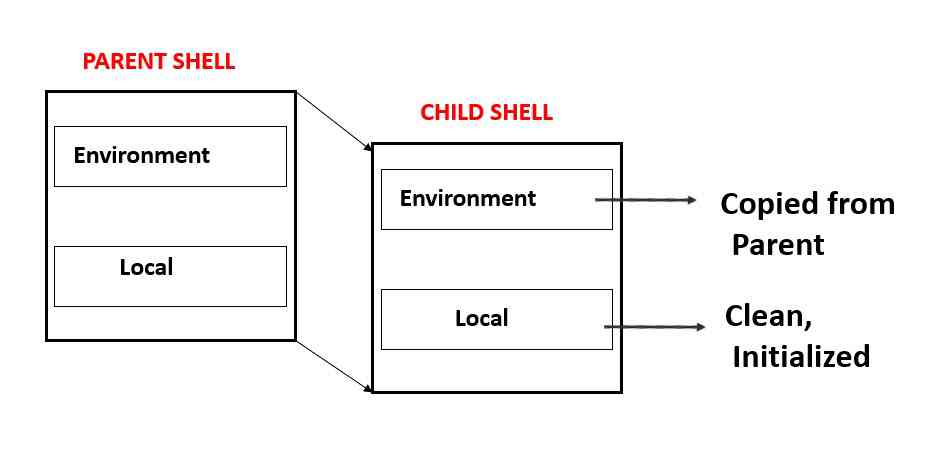
Every shell contains two data areas:
|
A child shell inherits a copy of its parent’s environment space and a clean local-variable space:
|

