Grep
Basics of Grep Command
| grep command |
| grep stands for Global Regular Expression Parser
Use grep to search file for a pattern and display both matching and non-matching lines. The various grep option to display a count, line numbers or filenames. The concept of regular expression as a mechanism for matching multiple similar patterns. |
| The command uses the following syntax
grep options pattern filename(s) |
| grep searches for a pattern in one or more filename(s), or the standard input if no filename is specified.
Consider a file employee.list with following data EmployeeID Dept. Salary Name 101 sales 25000 Ajay 102 IT 32000 Mohit 103 Admin 23000 Rohit 104 sales 25050 Akshay |
| Search for pattern sales in employee.list
grep “sales” employee.list |
| A pattern can also be searched within multiple files. If grep cannot find a line in any of the
specified files that contain the requested pattern, the output is produced. |
| grep options |
| Ignoring case ( – i )
When you look for a name but are not sure of the case, use the – i ( ignore) option. This option ignores the case for pattern matching. grep –i ‘ajay’ employee.list |
| 101 sales 25000 Ajay |
| Deleting lines ( -v )
The –v option for grep select all the lines except those containing the pattern. |
| Create a file for employees who are from a department other than sales |
| grep -v ‘sales’ employee.list |
| EmployeeID Dept. Salary Name
102 IT 32000 Mohit 103 Admin 23000 Rohit |
| Displaying line numbers ( -n )
The –n option displays the line number containing the pattern along with the lines |
| grep -n ‘sales’ employee.list |
| 1: 101 sales 25000 Ajay
4: 104 sales 25050 Akshay |
Grep Basic option Examples: -i -v -n

Grep options counting lines, Displaying Filenames & Matching Multiple Patterns
| grep options |
| Counting Lines Containing Pattern ( -c )
The –c option counts the number of lines containing the pattern ( which is not the same as the number of occurrences). |
| grep –c ‘sales’ employee.list |
| Displaying Filenames ( -l )
The –l (list) option displays only the names of files containing the pattern : For example, copy the contents of employee.list to employee1.list and employee2.list |
| grep –l ‘sales’ *.list |
| Matching Multiple Patterns ( -e ) |
| grep –e “IT” -e “Admin” employee.list |
Grep option examples: -c -l -e

Grep option pattern from a file
| grep options |
| Taking a pattern from a file ( -f )
You can place all partitions in a separate file, one pattern per line. Contents of pattern.list IT Admin grep uses the –f option to take patterns from a file. |
| grep –f pattern.list employee.list |
Grep option pattern example: -f

Various other options used in Grep command
| Options used by grep | |
| Option | Significance |
| –i | Ignores case for matching |
| -v | Doesn’t display lines matching expression |
| -n | Displays line number along with lines |
| -c | Display count of number of occurrences |
| -l | Displays list of filenames only |
| -e exp | Specifies expression with this option. Can use multiple times. Also used for matching expression beginning with a hyphen |
| -x | Matches pattern with entire line (doesn’t match embedded patterns) |
| -f file | Takes pattern from file, one per file |
| -E | Treats patterns as an extended regular expression (ERE) |
| -F | Matches multiple fixed strings ( in fgrep style) |
Concept of Basic Regular Expressions (BRE)
| Basic Regular Expressions (BRE) |
| Like the shell wildcards which match similar filenames with a single expression, grep uses an expression of a different type to match a group of similar patterns. Unlike wild-cards, however, this expression is a feature of the command that uses it and has nothing to do with shell.
If an expression uses any of these characters, it is termed a regular expression. |
| POSIX identifies regular expression as belonging to two categories.
Basic & Extended Grep supports basic regular expression (BRE) & extended with –E option. |
The Basic Regular Expression (BRE) character set list
| The Basic Regular Expression (BRE) character set | |
| Option | Significance |
| * | Zero or more occurrence of the previous character |
| g* | Nothing or g, gg, etc. |
| . | A single character |
| .* | Nothing or any number of characters |
| [pqr] | A single character p, q or r |
| [c1-c2] | A single character within ASCII range represented by c1 and c2 |
| [1-3] | A digit between 1 and 3 |
| [^pqr] | A single character which is not a p, q or r |
| [^a-zA-Z] | A non-alphabetic character |
| ^pat | Pattern pat at beginning of file |
| Pat$ | Pattern pat at end of file |
| Hello$ | Hello at the end of line |
| ^Hello$ | Hello as the only word in line |
| ^$ | Lines containing nothing |
Examples for Basic Regular Expressions (BRE)
| Examples for Basic Regular Expressions (BRE) |
| grep “[Ss]a*[Ll][Ee][Ss]” employee.list
grep “[01]0*[01]” employee.list grep “[1][^1][1]” employee.list grep “s.*s” employee.list grep “^1” employee.list grep “t$” employee.list |
Grep: Basic Regular Expression example using the command

Extended Regular Expressions (ERE) and egrep
| Extended Regular Expressions (ERE) and egrep |
| Extended Regular expression makes it possible to match dissimilar patterns with a single expression. POSIX-compliant version of grep uses them with the –E option. If your version of grep doesn’t support this option, then use egrep but without the –E option. |
| The + and ? |
| The ERE set includes two special characters, + and ?
They often used in the place of * to restrict the matching scope. They signify the following : |
| + Matches one or more occurrences of the previous character
? Matches zero or more occurrence of the previous character |
| In both cases, the emphasis is on the previous character. This means that b+ matches b, bb, bbb, etc., but unlike * it doesn’t match anything. The expression b? matches either a single instance of b or nothing. These characters restrict the scope of the match as compared to the * |
| grep –E “[01]0?[23]” employee.list |
| grep –E “[01]0+[1234]” employee.list |
Grep: Extended Regular Expression example using the command

Extended Regular Expressions (ERE) and egrep
| Extended Regular Expressions (ERE) and egrep | |
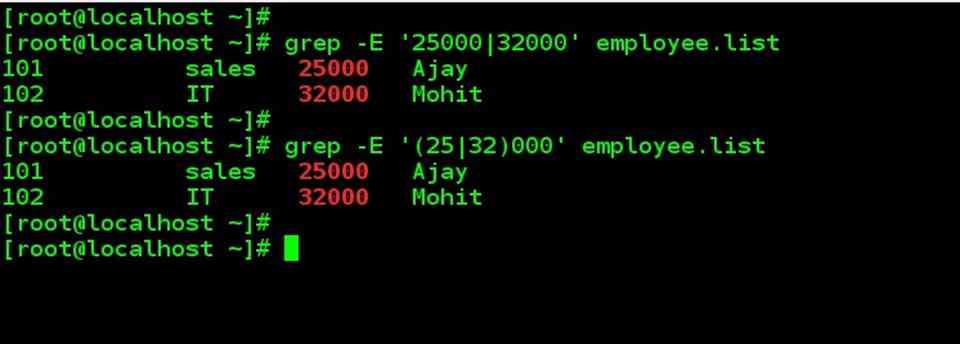
| Matching Multiple Patterns | () | |
| The | is the delimiter of multiple patterns. | |
| grep –E ‘25000|32000’ employee.list | |
| The ERE thus handles the problem easily, but offers an even better alternative. The characters, ( and ) let you group patterns, and when you use the | inside the parentheses, you can frame an even more compact pattern : | |
| grep –E ‘(25|32)000’ employee.list | |
| Extended Regular expression (ERE) used by grep | |
| Expression | Significance |
| ch+ | Matches one or more occurrences of character ch |
| ch? | Matches zero or more occurrences of character ch |
| exp1|exp2 | Matches exp1 or exp2 |
| GIF|JPEG | Matches GIF or JPEG |
| (x1|x2)x3 | Matches x1x3 or x2x3 |
| (lock|ver)wood | Matches lockwood or verwood |
Extended Regular Expressions (ERE) and egrep examples