
Shell: Login, Basic Commands & Usage
Logging on Linux machine
-
-
- Logging in to a Unix machine requires an account on that system.
- A user account is associated with login and password.
- “login” is your user name (usually some variant of your real name)
- Your password will not echo as you type
- Remember good password practices
-
What exactly is a “shell”?
- After logging in, Linux starts another program called the shell
- A shell is a program that reads commands that are typed on a keyboard and then executes (i.e., runs) them.
-
- Shells are the most basic method for a user to interact with the system.
- The most popular shells are: tcsh, csh, korn, and bash
- The default shell on most Linux systems is bash.
- For this tutorial, we are using bash
-
- Shell commands are CASE SENSITIVE!
Connecting to a Linux system
Open up a terminal:
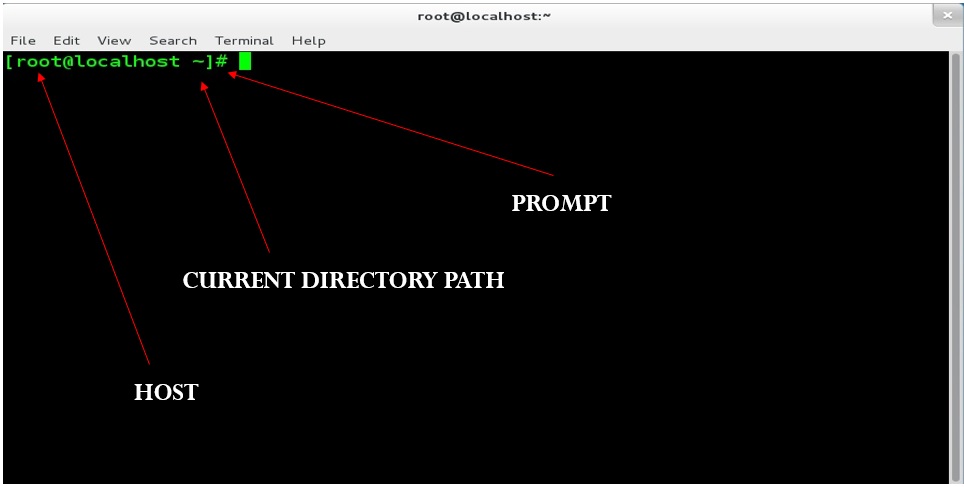
What is a Command
-
-
- A command is an instruction given by a user telling a computer to do something, such a run a single program or a group of linked programs.
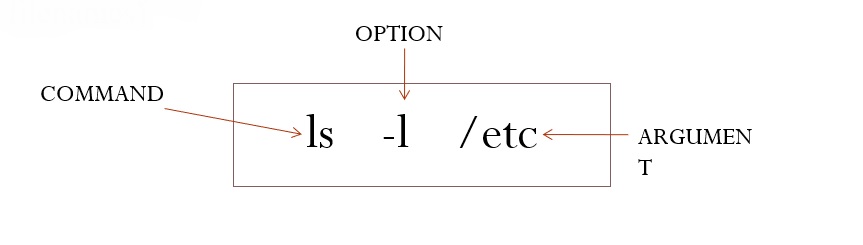
- command [options] [argument(s)] . There must be space b/w command, option, and arguments. The option always begins with ‘-’
- Option and Arguments are optional
- Options modify a command’s execution
- Arguments indicate upon what command should act (often filenames)
-
BASIC COMMANDS AND USAGE
-
-
- ls show files in current position
- cd change directory
- cp copy file or directory
- mv move file or directory
- rm remove file or directory
- pwd show current directory
- mkdir create directory
- rmdir remove directory
- cat display file contents
- less display file contents pagewise
- man display manual for command
-

